Changing the Complex Profile
Purpose:
Changing the Complex Profile can be an effective way to troubleshoot and isolate different parts of the RP8400.
Objective:
Isolate Cell Boards to determine if a component directly associated with one could be causing the issue seen.
Example:
Customer was unable to boot from DVD or from the installed disks, system would freeze and the activity log would show START_2ND_LVL_IO_CONFIG with no progress
Solution:
Changing the Complex Profile allowed the machine components to be isolated and tested apart from other components. Being able to change the profile to a single Cell Board and only the components associated with it allowed the Field Engineer to discover which component was causing the system to freeze while attempting a boot/POST.
[[#How to restore the Complex Profile]]
[[#Restoring with parmodify command]]
How to change the Complex Profile:
Connect to the [[Management Processor (MP)]]
- Move into the Command Menu tree
- MP:
CM
- MP:
- Reset Reconfiguration
- MP:CM>
RR
- MP:CM>
-
Change the Complex Profile
- MP:CM>
CC- Select profile to build or restore:
G - Enter cell number:
Be sure to enter the cell number you are trying to work with
- Select profile to build or restore:
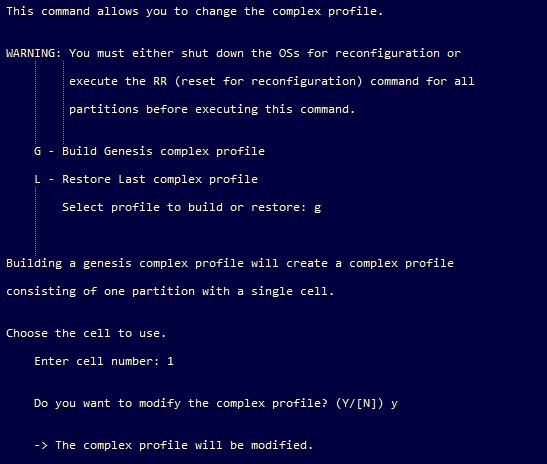
4. Verify that the system sees only the cell board that you want to work with
1. MP:CM>CP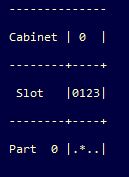
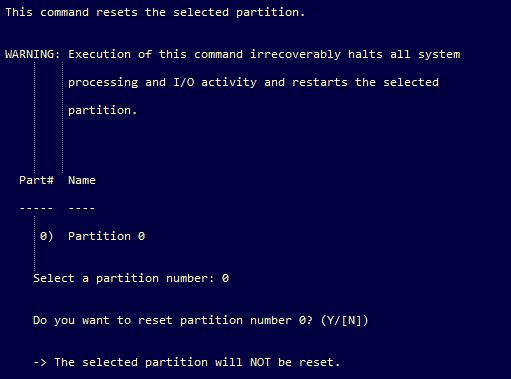
5. Reset Selected Partition
1. MP:CM>RSBe sure to enter the partition you are working with
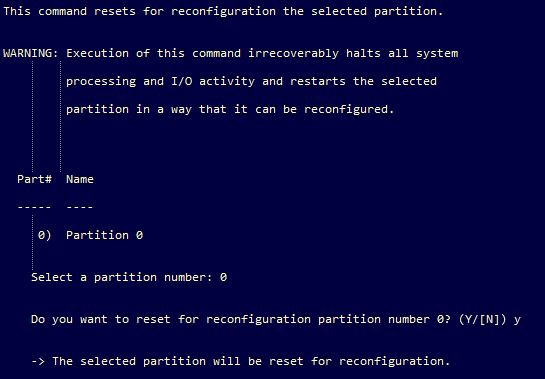
6. Reset Reconfiguration
1. MP:CM>RRBe sure to enter the partition you are working with
- MP:CM>
System is now ready for further troubleshooting
How to restore the Complex Profile
Connect to the MP [[Management Processor (MP)]]
- Move into the Command Menu tree
- MP:
CM
- MP:
- Reset Reconfiguration
- MP:CM>
RR
- MP:CM>
-
Change the Complex Profile
- MP:CM>
CC- Select profile to build or restore:
L - Do you want to modify the complex profile? (Y/[N])
Y
- Select profile to build or restore:
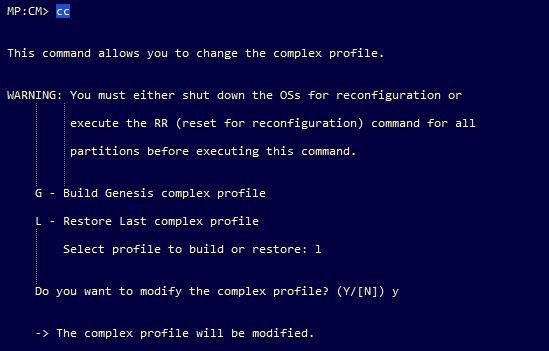
- MP:CM>
If the restore fails with this error -
RtnCodeComplexProfileACorruptedfollow steps below
Restoring with parmodify command
Conditions:
Complex Profile has been modified and the Restore last config option is not working
Resolution:
- To use the parmodify command we need to boot the system to hpux single user mode
- [[Gain Access to BCH]]
- From the BCH menu search all bootable devices
- Main Menu: Enter command or menu >
sea all
- Main Menu: Enter command or menu >
- Boot the OS into single user mode
- Main Menu: Enter command or menu >
bo <Path#> - Do you wish to stop at the ISL prompt prior to booting? (y/n) >> y
- ISL> hpux -is
- this boots to single user mode
- Main Menu: Enter command or menu >
- Mount the needed folder to execute the parmodify command
mount /usr
- Modify the system to include the missing cell board(s)
parmodify -p0 -a 0:::- partition -p
- add -a
- cell board position 0:::