UCS DIMM Blocklisting Errors
Problem:
Replaced DIMMs are still showing problems in that slot, swapping known good DIMMs into affected slots does not resolve the issue.
Possible Cause:
Known issue on UCS servers
Resolution:
- Log into CISCO UCSM GUI
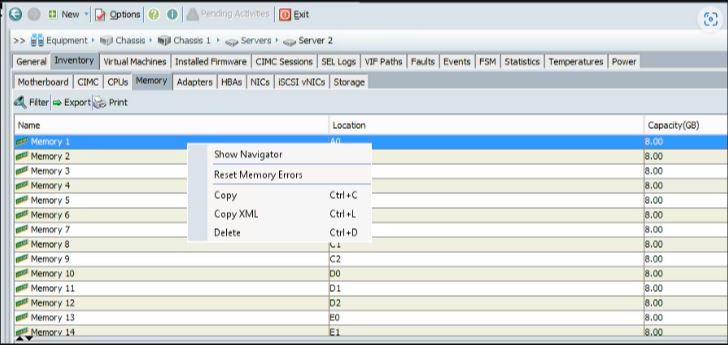
- Navigate to Equipment >> Chassis > Chassis x > Servers > Servers x
- Then Inventory > Memory
- Right-click on the affected slot and select [Reset Memory Errors]
-- Or --
- Log into UCSM CLI
- Run below command
reset-all-memory-errors
Cisco Documentation - Troubleshoot DIMM Memory Issues in UCS - Cisco