Boot shell and lockdown recovery
Not your average Netapp, doesn't have typical "Ontap" OS installed
Based on LSI Engenio (Santricity?)
Same machine as IBM DS3000 or Dell MD3000, other vendors use it too and sometimes things are easier to find by searching the alternate machine type.
Mini USB to 9pin serial cable:
Dell PN: 0VPNP6
IBM PN: 38556-00
During controller POST issue a \
Initial Shell Access Procedure:
2. Press \
3. When you see "Press Space Bar within 5 Seconds To Set Baud rate," press the Space Bar. Wait till you see that the Baud rate reports being set before going to step 4.
4. Press \
5. When you see "Press Space Bar within 5 Seconds To Set Baud rate, or Press \
Logins (from Ian):
they used to use the same as IBM & SUN versions.
shellUsr + wy3oo&w4
shellUsr + infiniti
shellUsr + y2llojp
I also have other user / pass options:
user: shellUsr
Pass:
wy3oo&w4
y2llojp
DF4m/2>
infiniti
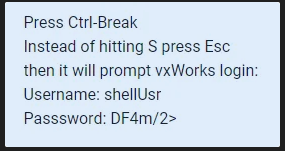
Trying to get to the shell, but not doing right or using wrong user/pw, not sure at this point. Have tried "S" and "esc" and several different passwords. I think I'm on the right track at least
We finally got here:
Press within 5 seconds: \ for Service Interface, \
Version ver03.0A
VxW Passed
Diagnostic Manager exited normally.
shellUsr
shellUsr
Password:
Login incorrect
VxWorks login:
MD3000 lockdown recovery
If controller A is in lockdown:
- Run the following commands on both controllers using the serial port connection with password wy3oo&w4
lemClearLockdown
clearHardwareLockdown
psvClearSodRebootLoopCounter
- Then unplug ctrl-A and run the following commands on ctrl-B:
loadDebug
cmgrSetAltToFailed
cmgrSetAltToOptimal
- Then Hot-plug ctrl-A.