Manually Releasing SED Disks
Problem:
Unable to access SED disks after a reformat or reimage, error similar to "Unable to release ownership of "da1", result "Drive authorization failure""
Conditions:
SED disks will need to be manually released
You will need the PSID number off each individual disk
A putty connection for the bash shell to release disks manually
Solution:
- Power off the problem node
- Carefully remove all drives associated with that node, be mindful that the drives go back in the same position they were removed
- Capture (preferably with a picture) the PSID found on the label on each drive
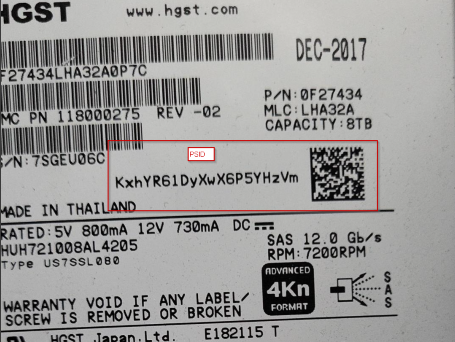
- Once the boot process of the node reaches an option menu, press key combo "ctrl+c" to drop to bash. Most of the time you will need to press "enter" to confirm
- From the bash prompt "#" start manually releasing SED disks
/usr/bin/isi_hwtools/isi_sed_batch revert
Note: If this command fails to complete, we can run the command one bay at a time
/usr/bin/isi_hwtools/isi_sed revert <bay#>
bay0 is the SSD, disk A0 starts at bay3
Bays are ordered from top to bottom A - E and 0 - 2.