Switch Replacement
Pre-work on existing switch
- Capture the version
show version
- Save Config for replacement switch
- Save the running config to the startup
copy running-config startup-config- Copy the start up-configuration to a file server using any of the available methods on the switch (FTP, TFTP, SFTP, and SCP).
copy startup-config scp://<user@host>/<switch>.config- Alternatively with the log being captured
show running-config
- Capture port assignments
show flogi database
- Unrack switch, move over all SFPs to the replacement switch
Post replacement
- Rack switch
- Connect to the replacement switch, do not run setup script if asked
- Erase switch configuration
write erase
- Reload the switch
reload
- Press CTRL+Z to ignore factory default prompt
config terminal
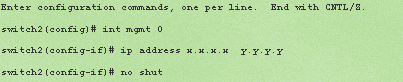
6. Capture wwn this will be used if interface based zoning was done
show wwn switch
- Create a backup of the config file
- Edit the config to be used, remove the lines that contain the SNMP user accounts (snmp-server user .....)
- If using interface zoning, replace switch wwn (swwn) in the file with the replacement switches wwn captured in step 6.
- If IVR was configured switch wwn needs to be updated, search ivr or switch-wwn. Replace swwn with swwn captured in step 6.
- Save and Exit the config file
- Apply the modified text file to the switch
copy scp://<user@host/<config file>.config running-config
If the copy is successful you will see the commands being executed with a progress bar
Dragging the config file and dropping it into the putty session might also work
- Save the new config
copy running-config startup-config
- Connect all fiber cables to their previous ports, can use Flogi database to verify
- Customer can create all SNMP users again
Reference: MohanKumar: How to Replace the CISCO MDS 9124 San Switch chassis