Controllers not powering on
Problem
System will not power on.
Possible Cause:
System power outage
Controller failover scenario
Controller showing bad block entries
Dirty CACHE
Firmware mismatch
Resolution:
Scenario 1 - bad blocks on a LUN
- Allow the system to come up to a CLI prompt
- Enter a shell from the CLI prompt
su exec sh
- Execute the raidtool command to determine which LUN has the bad blocks
raidtool
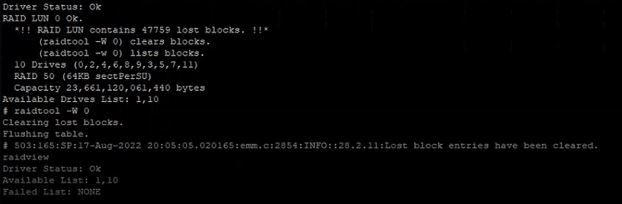
RAID LUN 0 contains 47759 lost blocks
- Clear the bad blocks from the LUN
raidtool -W <LUN#>
example: raidtool -W 0
Scenario 2 - Dirty CACHE
- Allow the system to come up to a CLI prompt
- From the CLI prompt run clearlostdata
clearlostdata
After both of these scenarios it is paramount that the customer checks the integrity of their data!
Scenario 3 - Firmware mismatch on the controllers
- In the event that there is a firmware mismatch reported and the array will not come online, we can set a variable to ignore this for the sake of progressing through troubleshooting.
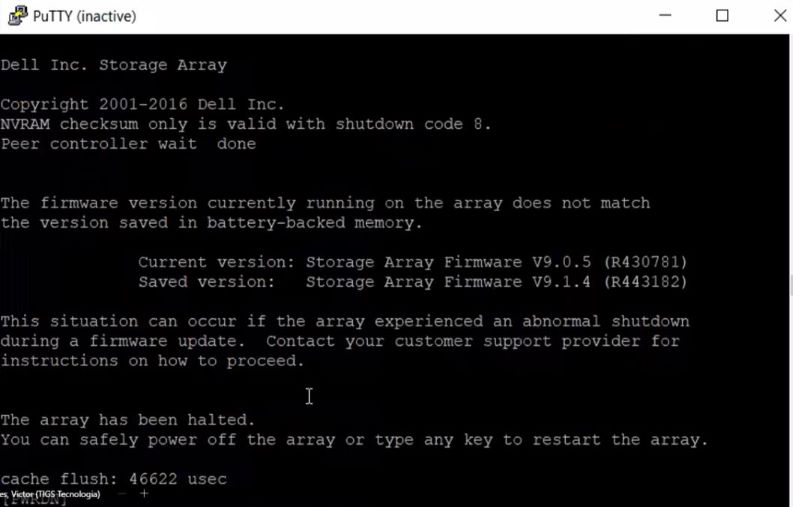
- Allow the array to boot to a point where you see "press Ctrl+p for a shell"
- Once in the shell, set the environment variable to ignore the f/w mismatch
setenv EQL_VERSION_BYPASS 1